AO3 Formatting is a Nightmare
An exploration of bad formatting on AO3.
Disclaimer
This article is not meant to disparage AO3 authors in any way. They write incredible stories, are likely not familiar with HTML, and generally have much better things to do than nitpick the formatting of their stories. I, on the other hand, have spent an immense amount of time looking through AO3 source code for my web scraping projects, and have Seen Some Things™. My intention here is to have some fun, and hopefully to point out a few ways to improve the formatting of future AO3 works.
Paragraphs
The canonical AO3 formatting error is bad paragraph formatting. This takes
many forms, from extra blank paragraphs to multi-paragraph paragraphs broken by
poor <br>
tags and more.
Of them, the more harmless is the empty paragraphs. This, like almost all problems, arises
from quirks of word processors. If you don't specify a certain margin between paragraphs,
<p> elements next to each other will have no space between them. Thus
the author instead has an empty paragraph between each real paragraph for spacing. This
causes problems because AO3 will add that proper margin between paragraphs, which
combined with the extra space for the blank paragraph results in massive gaps between
paragraphs. See figure 1 for an example.
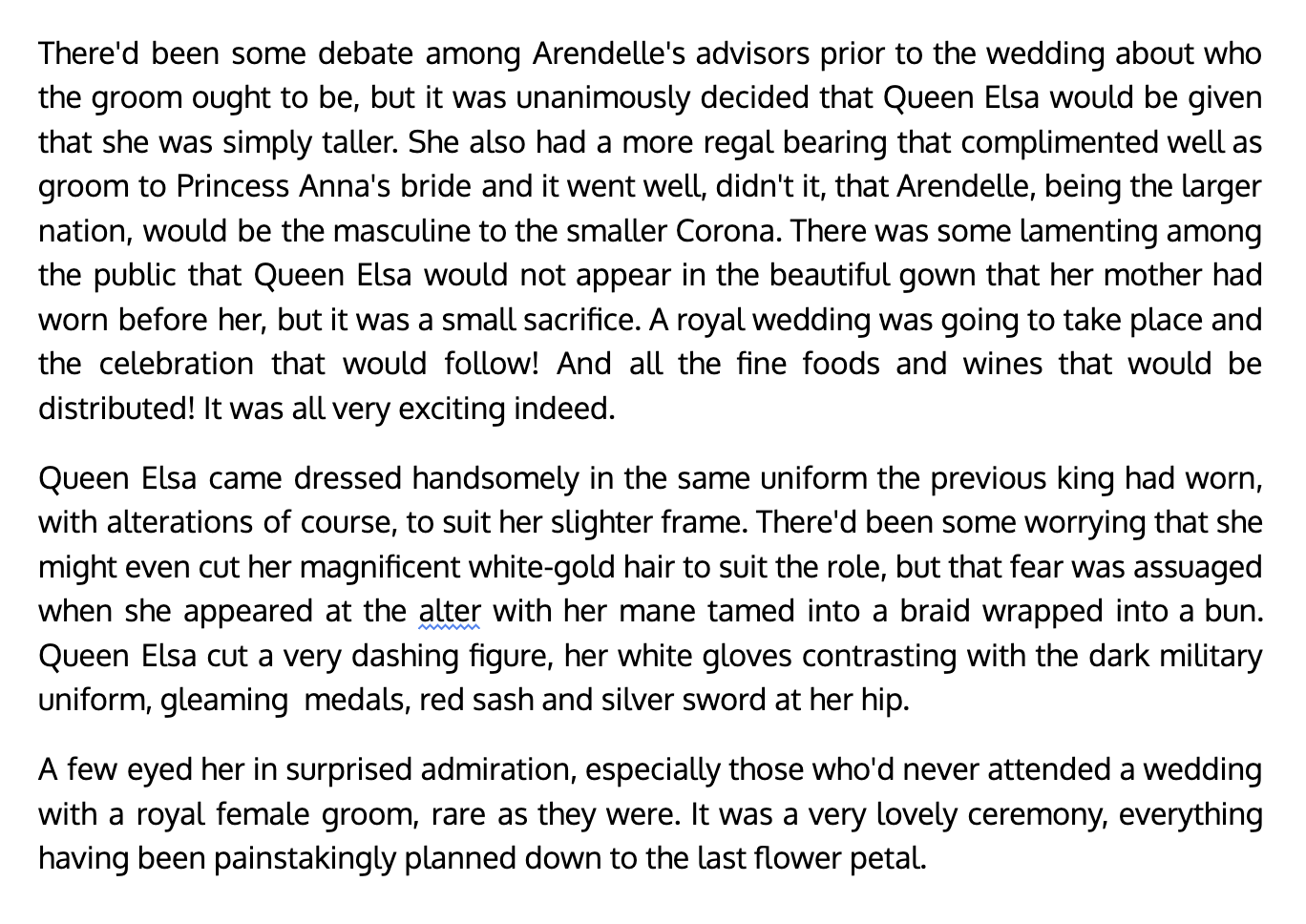
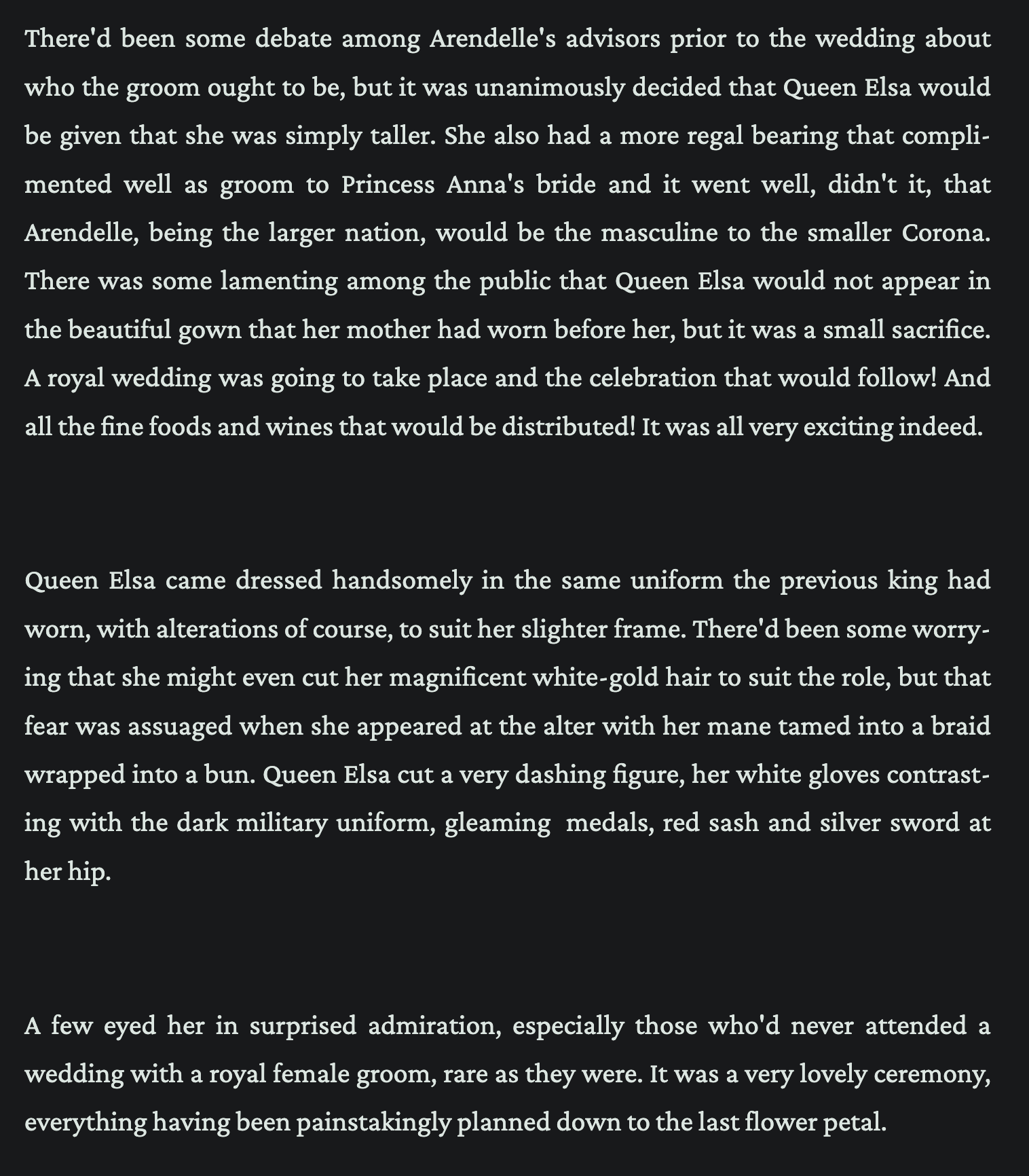
If you've noticed, I already mentioned the solution to this problem: simply ensure that your word processor is set to add a margin between paragraphs, and that empty paragraphs are not added.
Ultimately, empty paragraphs are an annoyance, but benign in the scheme of things. They don't really break anything, just makes them less visually appealing. True pedants (that's me) can use scripts to automatically remove them if it annoys them enough (it does).
A complement to the empty paragraph is the pointless inner span. This is when every single
paragraph is actually
<p><span>…</span></p>. This generally has the same
effect as empty paragraphs, it just adds excessive space between paragraphs.
Unlike empty paragraphs, this is much likelier to be an effect of word processors just doing stupid stuff with HTML. I have no idea how this happens, and I don't want to.
A more serious formatting error is adding <br> tags instead of proper
paragraph breaks. In the worst case, the entire chapter is a single paragraph broken up by
a series of <br> tags. This will cause the every single paragraph to
have zero spacing between them (by default). Most of the time, the
“multi-paragraphs” aren't the entire length of the chapter, but contain a few paragraphs
each. This instead leads to inconsistent spacing, where the actual paragraphs do have
spacing between them, but the “multi-paragraphs” do not. Suffice it to say, it looks ugly.
But more importantly than visual appeal, “multi-paragraphs” are an accessibility issue, as
explained in the MDN HTML reference.
Creating separate paragraphs of text using
<br>is not only bad practice, it is problematic for people who navigate with the aid of screen reading technology. Screen readers may announce the presence of the element, but not any content contained within<br>s. This can be a confusing and frustrating experience for the person using the screen reader.Use
<p>elements, and use CSS properties like margin to control their spacing.
When it comes to multi-paragraphs, the root causes are many. It could be that this is how the word processor stores the underlying HTML. It could be that the user pressed shift + enter to create a line break, which will add a break instead of a new paragraph. You get the idea.
<p>
    Auradon was confusing. They had known that it would be, but things
    just didn't make any sense here.
    <br />
    The Fairy Godmother looked upon her daughter with pride for even
    just walking into a room, and the love she felt for the shy girl
    was so evident.
    <br />
    The VKs watched it closely, unable to comprehend. What had Jane
    done that was so great that she was constantly showered in love
    that the girl didn't even seem to understand was a gift.
    <br />
    It didn't make sense, and Mal watched Evie's hands clench when she
    watched Fairy Godmother tell her daughter that she was beautiful
    inside and that mattered more than any kind of outer beauty. She
    watched the little witch press her nails into her wrists like her
    mother had, looked like she might vomit because that couldn't be
    true. It went against everything the Evil Queen had drilled into
    Evie, who had been forced to sit in front of a mirror for hours
    with her mother and point out every single imperfection until she
    was sobbing and her head was pounding with pain.
</p>
Emphasis & Strong
As I'm sure anyone who's read a significant amount of fanfiction knows, authors tend to really like adding some stylistic flair to their works. This comes in the form of overusing almost every possible piece of punctuation of decoration, from em-dashes to semicolons to parenthesis. But of course, the biggest offender of all is the humble emphasis.
On the positive side, WYSIWYG (what you see is what you get) editors like Google Docs or Microsoft Word show italics as italicized text, so you can be confident that the italics are visually correct in AO3. On the negative side, the semantics are the worst thing ever. This is because the way these editors convert text to italic or bold is by selecting it, and often users will accidentally select surrounding whitespace or punctuation. Because whitespace and punctuation generally do not change appearance based on text decoration, it's visually the same, but semantically wrong. For an example of this, look no further than at your earliest convenience, which uses italics extensively.
<p><em>"Wicked?" </em>Elphaba blurts, <em>stupidly. </em></p>
<p>
  And, <em>bother, stupid stupid bother, </em>of course Glinda would
  recognise her voice. The woman jolts in physical reaction, turns her
  head ever-so-slowly towards Elphaba.
</p>
<p>
  It feels like the world stops for a moment. She can feel her heart
  beat hard against her ribcage, as big, brown, stupidly <em>doe </em>eyes
  land on her. Elphaba wonders how she ever lived without her gaze.
</p>
<p>
  "Oh. Oh dear. Um." Glinda bubbles. Then she shoves the palms of her
  hands into her eyes and begins to <em>laugh. </em>"That's... Oh, good
  bloody Oz— I'm going <em>barmy, </em>this is just so—"
</p>
<p>
  It sounds hysterical. Hitching, and high-pitched giggles that,
  concerningly, abruptly melt into what can only be described as
  <em>sobbing. </em>
</p>
<p>
  "Barmy, I've gone utterly, <em>utterly </em>barmy. Oh, you sound just
  like my old— my old—" An exquisitely pained <em>keen </em>escapes her.
  "Well, what do you know, you brigand? Oz, how awful—I've
  <em>finally</em> lost my marbles—"
</p>
<em> placement.
This is a snippet from
at your earliest convenience by
Verannode
While this visually looks perfect, the emphasis tags are not even close to correct with regards to whitespace. For instance, in stupidly <em>doe </em>eyes, the emphasis tags should have no whitespace on the inside. So it should be stupidly <em>doe</em> eyes. This also applies to punctuation. For example, in I’m going <em>barmy, </em>this is just so—, the emphasis is on the word barmy and not on the punctuation. So it should be I’m going <em>barmy</em>, this is just so—.
But note that sometimes the punctuation is part of the emphasis, as is often the case when the entire sentence is emphasized. This type of punctuation is known as “logical punctuation” (aka the British style), which aims to only surround the word or phrase being emphasized, and not additional punctuation that surrounds it, as is the case with the US convention. While I personally prefer the logical style, either is fine so long as it is consistent. What is really important is that whitespace is not emphasized. The emphasis should be tight to the word or phrase being emphasized, without any extra spacing.
Everything I've explained about emphasis also applies exactly the same for strong (as well as quotes, parentheses, and any punctuation which surrounds text).
A Simple Problem
While the possibilities for incorrect HTML are endless, the solution is both universal and
simple: manually review the output HTML. Think of it like the final revision, which can
only you do as the final step before publication. All these problems are easily caught and
fixed. There are also plenty of resources for learning how to write semantic HTML.
MDN Reference is
one such resource, as is the official HTML standard at
WHATWG. You don't need to read
everything. For a writer, all you really need to know are the text elements, such as
<p>, <em>, and <strong>.
Alas, as I know firsthand, fixing up HTML might be easy, but it can be time consuming (as in long chapters might take you 30 minutes or more to fix). You can use certain regex tools to find and fix common issues, but this should be done carefully, as there are always edge cases where the pattern might be incorrect. This is the strategy that many reader-facing tools use. For writers though, a better approach likely is to just ask write the document in HTML to begin with, so that you have maximum control over the output. I promise this isn't as bad as you think.
And then there is the nuclear option: ask AI to fix the HTML for you, specifying not to
touch any of the content. Though I understand if you don't want to feed your story to an
AI (though if you post it it's probably going to be scraped anyways, AI companies couldn't
care less about the robots.txt).
I hope this little guide helps you write better HTML for your fanfiction, or at least understand why it might look the way it does.